 PH
PHGood day sa lahat!
I'm back! Kumusta kayo? I will just share this "trick" para sa mga katulad ko na nahihirapan magkaroon ng YouTube Premium 4 Months at naiiklian sa 1 Month Premium. Kaya I'll post a thread na para masulit natin 'to habang mayroon pa.
Mga Kailangan:
Steps:
1. Connect to internet at pumunta sa browser.
2. I-search ang YouTube. I-login ang account. Hindi sa YouTube app, sa browser.
3. Pindutin ang profile icon na makikita sa upper right corner then "Get YouTube Premium."
4. Piliin ang GCash as your payment method. I-link ang GCash account na may ₱10 na laman.
6. Pindutin ang "Purchases and Membership" then "Cancel subscription." Ito ay para hindi mag-charge after 2 months.
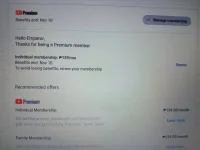
Proof:
I'm back! Kumusta kayo? I will just share this "trick" para sa mga katulad ko na nahihirapan magkaroon ng YouTube Premium 4 Months at naiiklian sa 1 Month Premium. Kaya I'll post a thread na para masulit natin 'to habang mayroon pa.
Mga Kailangan:
- Chrome Browser
- GCash Account na may lamang at least ₱10
- PH-based Gmail Account (Old and fresh will do)
- Internet
Steps:
1. Connect to internet at pumunta sa browser.
2. I-search ang YouTube. I-login ang account. Hindi sa YouTube app, sa browser.
3. Pindutin ang profile icon na makikita sa upper right corner then "Get YouTube Premium."
4. Piliin ang GCash as your payment method. I-link ang GCash account na may ₱10 na laman.
5. Kapag na-purchase niyo na, pindutin niyo ulit 'yung profile icon niyo.Note: Kahit na more than ₱10 ang laman ng GCash account mo, ₱10 lang ang mababawas dito.
6. Pindutin ang "Purchases and Membership" then "Cancel subscription." Ito ay para hindi mag-charge after 2 months.
Proof:
 ty ys
ty ys
