PH
PHGUIDE:
STEP 1. Download and install modified PPCine or FreeCine app on your device. After installation, tap and hold PPCine/FreeCine > App info > App battery usage > Unrestricted (allow battery usage in background/do not restrict background activity).
You do not have permission to view the full content of this post. Log in or register now.
STEP 2. Make sure your Phone and TV/Box are on the same Wi-Fi network.
STEP 3. Stream receiver installation.
OPTION 1:
• Install the AirReceiver app on your TV/Box.
You do not have permission to view the full content of this post. Log in or register now.
You do not have permission to view the full content of this post. Log in or register now.
You do not have permission to view the full content of this post. Log in or register now.
• Open the AirReceiver app on your TV/Box and follow the steps on screen (grant all permissions).
OPTION 2:
• Install the AirPin PRO app on your TV/Box.
You do not have permission to view the full content of this post. Log in or register now.
• Open the AirPin PRO app on your TV/Box and follow the steps on screen (grant any permissions).
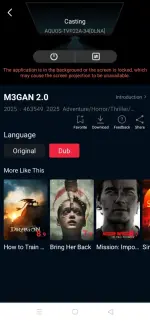
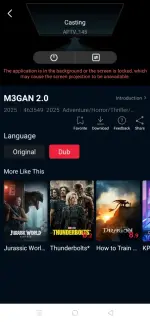
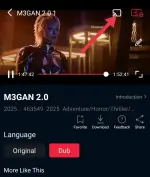
STEP 4. Launch the PPCine/FreeCine app on your device and tap the Cast icon.
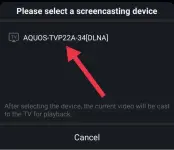
STEP 5. Choose your TV/Box or APTV_ from the list, and tadaaaaaa... Enjoy!
STEP 1. Download and install modified PPCine or FreeCine app on your device. After installation, tap and hold PPCine/FreeCine > App info > App battery usage > Unrestricted (allow battery usage in background/do not restrict background activity).
You do not have permission to view the full content of this post. Log in or register now.
STEP 2. Make sure your Phone and TV/Box are on the same Wi-Fi network.
STEP 3. Stream receiver installation.
OPTION 1:
• Install the AirReceiver app on your TV/Box.
You do not have permission to view the full content of this post. Log in or register now.
You do not have permission to view the full content of this post. Log in or register now.
You do not have permission to view the full content of this post. Log in or register now.
• Open the AirReceiver app on your TV/Box and follow the steps on screen (grant all permissions).
OPTION 2:
• Install the AirPin PRO app on your TV/Box.
You do not have permission to view the full content of this post. Log in or register now.
• Open the AirPin PRO app on your TV/Box and follow the steps on screen (grant any permissions).
STEP 4. Launch the PPCine/FreeCine app on your device and tap the Cast icon.
STEP 5. Choose your TV/Box or APTV_ from the list, and tadaaaaaa... Enjoy!