 PH
PHrendezvous17
Established
Mga Boss kumakagat poba sa 9gb shareable data yung GOSURFBE34? pang extend lang po ng araw, TIA po sa Sasagot 
ayun ayos na yan boss 15 days! maraming salamat po sa info Boss malaking tulong para sa kuya koto, di sya malakas sa data ehGoCreate n lng sa Globe One app, 15 days, 3GB open data(All-access data) + Unli All-net texts for 51 pesos, pumapatong mga GO promos minus the freebies dun. Di ko lng alam kung pamatong shareable data dun.

thanks po dito. medyo goods to kesa sa go50 kasi may unli textGoCreate n lng sa Globe One app, 15 days, 3GB open data(All-access data) + Unli All-net texts for 51 pesos, pumapatong mga GO promos minus the freebies dun. Di ko lng alam kung pamatong shareable data dun.
pano po pala mag go creat boss? diko makita kung saan at pano sa globeone app.GoCreate n lng sa Globe One app, 15 days, 3GB open data(All-access data) + Unli All-net texts for 51 pesos, pumapatong mga GO promos minus the freebies dun. Di ko lng alam kung pamatong shareable data dun.
pano po pala mag go creat boss? diko makita kung saan at pano sa globeone app.
maring salamat po Boss, kaya pala diko makita wala po pala sa TM, pa bilhin ko nlng Globe sim utol ko, Thanks a lot po ulit and Godbless
View attachment 2311802 View attachment 2311804 View attachment 2311805 View attachment 2311806
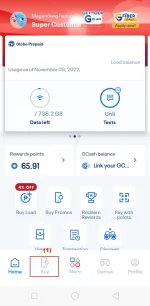
1) Punta ka sa Home tab ng GlobeOne app and tap “Buy” sa baba.
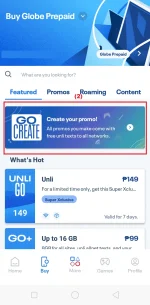
2) Tap the GoCREATE banner.
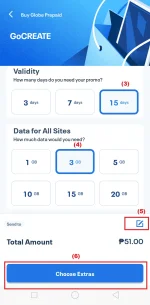
3) Select your preferred validity.
4) Select your preferred all-access data.
5) Piliin mo kung aling account 'yung gusto mong i-register.
6) Tap "Choose Extras".
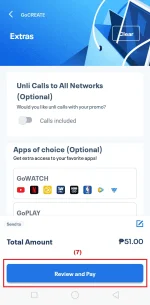
*Optional lang 'yung mga extras at di sila libre.
7)Tap “Review and Pay.”
View attachment 2311829 View attachment 2311831 View attachment 2311832
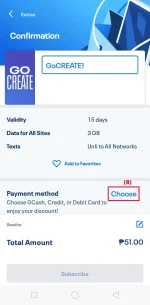
8) Choose your payment method.
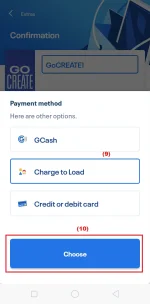
9) Choose whatever payment method you preferred. In this example, pinili ko is "Charge to Load".
10) Tap "Choose".
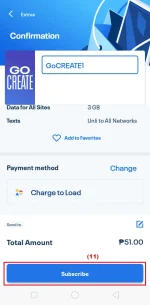
11) Tap "Subscribe" button.

Ebarg andaming data. Wifi yan?
View attachment 2311802 View attachment 2311804 View attachment 2311805 View attachment 2311806
1) Punta ka sa Home tab ng GlobeOne app and tap “Buy” sa baba.
2) Tap the GoCREATE banner.
3) Select your preferred validity.
4) Select your preferred all-access data.
5) Piliin mo kung aling account 'yung gusto mong i-register.
6) Tap "Choose Extras".
*Optional lang 'yung mga extras at di sila libre.
7)Tap “Review and Pay.”
View attachment 2311829 View attachment 2311831 View attachment 2311832
8) Choose your payment method.
9) Choose whatever payment method you preferred. In this example, pinili ko is "Charge to Load".
10) Tap "Choose".
11) Tap "Subscribe" button.