 PH
PH
Google Veo 3 Is Now FREE: Make Professional AI Videos With Zero Cost
Google has just opened up their Veo 3 AI video generator to everyone—with 100 free credits monthly and no payment required! Here’s how to get started:Step 1: Sign Up on Google's Flow Platform
Head to Flow, log in with your Google account, and you’ll immediately see 100 free credits pop up on your dashboard—no strings attached!
Step 2: Select Your Model Wisely
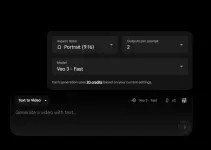
In project settings, choose between the Fast model (5 videos per month) or the Quality model (one high-end video per month). Beginners should start with Fast for drafts and save up for a Quality masterpiece.
Step 3: Create Stunning Videos
Input a detailed prompt for text-to-video or upload an image for frames-to-video. Specify exactly what you want—camera movement, sound, vibe, and duration—for the best results.
Step 4: Download and Share
Export your video in 720p with absolutely no watermark. If you’re lucky, you might get 1080p upscaling too (region-dependent).
Tips for Success:
- Always keep outputs to one per prompt to maximize credits.
- Free plan videos are perfect for sharing, testing, or pitching ideas.
Upgrade to Pro for 1,000 credits/month, or check if you qualify for the student plan for a year’s worth of free upgrades.
Google's latest Flow Labs update in September 2025 introduces key improvements for portrait video generation, making it easier to create high-quality vertical (9:16) videos that are ideal for social platforms like TikTok, Instagram Reels, and YouTube Shorts.
Sign up here: You do not have permission to view the full content of this post. Log in or register now.
This is the perfect time to experiment with AI filmmaking. Dive in, create, and share your first video while Veo 3 is still flying under the radar.
Your feedback is highly appreciated!


