 PH
PHCookies used for different websites such as Netflix and Grammarly are usually utilized for PC Browsers only.
However, even your iPads and iPhones can. Sa Safari lang. Safari allows extensions in one of their recent updates, you should be able to downlod Cookie Editor, the same chrome extension
STEPS:
1) Open 'App Store' and download You do not have permission to view the full content of this post. Log in or register now.
2) Open 'Safari' and open what website you'll be needing to put the cookies.
3) Press the little puzzle icon on the url box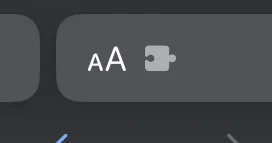 to use the extension.
4) Enjoy the cookies

NOTES
- Ensure that the extension is on at the Settings. Here's how:
Settings > Safari > Extensions > Allow These Extensions > On
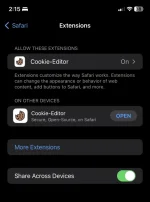
- Unlike for PC Browsers (e.g. Chrome), if sira na ang cookies, it would shows "Unknown Error" or the likes that notif upon importing, sa Safari, hindi.
Sharing is caring Welcome!
However, even your iPads and iPhones can. Sa Safari lang. Safari allows extensions in one of their recent updates, you should be able to downlod Cookie Editor, the same chrome extension
STEPS:
1) Open 'App Store' and download You do not have permission to view the full content of this post. Log in or register now.
2) Open 'Safari' and open what website you'll be needing to put the cookies.
3) Press the little puzzle icon on the url box
to use the extension.4) Enjoy the cookies
NOTES
- Ensure that the extension is on at the Settings. Here's how:
Settings > Safari > Extensions > Allow These Extensions > On
- Unlike for PC Browsers (e.g. Chrome), if sira na ang cookies, it would shows "Unknown Error" or the likes that notif upon importing, sa Safari, hindi.
Sharing is caring
Welcome!