PH
PHKamusta mga ka-PHC! 
May libreng Avast SecureLine VPN Premium tayo ngayon—good for 1 month, up to 100 devices! Sulit ‘to para sa mga gustong i-try ang premium VPN nang walang bayad. Check out the simple steps below!
 You do not have permission to view the full content of this post.
Log in or register now.
You do not have permission to view the full content of this post.
Log in or register now.
You do not have permission to view the full content of this post.
Log in or register now.
You do not have permission to view the full content of this post.
Log in or register now.
 You do not have permission to view the full content of this post.
Log in or register now. (Click mo ‘to!)
You do not have permission to view the full content of this post.
Log in or register now. (Click mo ‘to!)
2. Piliin kung Windows (.exe) or Mac (.dmg)
3. Disable all services except VPN before downloading!
4. Click "Download Installer"
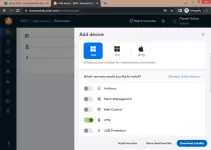
5. Install mo yung Avast Business Agent (kasama na VPN dito)

 1-month FREE VPN Premium
Coverage for 100 devices!
Uninstall mo lang yung software, tapos gawin ulit yung steps para makakuha ng bagong free month! Easy diba?
NOTE:
Tanong lang sa comments kung may problema! Enjoy mga ka-PHC!
May libreng Avast SecureLine VPN Premium tayo ngayon—good for 1 month, up to 100 devices! Sulit ‘to para sa mga gustong i-try ang premium VPN nang walang bayad. Check out the simple steps below!
STEP 1: Use a Temporary Email (Optional but Recommended)
Para sa privacy, gumamit ng temporary email para mas secure. Pwede rin naman personal email mo kung gusto mo. Try these sites: You do not have permission to view the full content of this post.
Log in or register now. You do not have permission to view the full content of this post.
Log in or register now.You do not have permission to view the full content of this post.
Log in or register now.STEP 2: Sign Up for Avast Business Hub
You do not have permission to view the full content of this post.
Log in or register now. (Click mo ‘to!)- Click "Login for the first time?" or "Create an Avast account"
- Ilagay yung email at password mo
- Click nyo lang po “CONTINUE”
STEP 3: Verify Your Email
- Check mo inbox mo (or temp mail) at i-verify yung account
- Pag verified na, balik sa Avast Business Hub, lagyan mo ng:
- Company name (kahit fake)
- First & last name
- Region: USA (important!)
- Click ‘Continue’ lang po
- Next, click ‘Continue to Hub’
STEP 4: Add Devices & Install VPN
1. Sa Dashboard, pindutin "Add Devices" (nasa baba right)2. Piliin kung Windows (.exe) or Mac (.dmg)
3. Disable all services except VPN before downloading!
4. Click "Download Installer"
5. Install mo yung Avast Business Agent (kasama na VPN dito)
STEP 5: Enjoy FREE Premium VPN!
Pagkatapos ma-install, refresh mo lang desktop mo (F5 for windows or Command + R for Mac users) at voila! 1-month FREE VPN Premium Coverage for 100 devices! PAANO ULITIN AFTER EXPIRED?
Uninstall mo lang yung software, tapos gawin ulit yung steps para makakuha ng bagong free month! Easy diba?NOTE:
- Pwede mo i-check yung subscription details sa Avast account mo
- Gamitin nang maayos! Wag kalimutan mag-thank you kung nakatulong!

Tanong lang sa comments kung may problema! Enjoy mga ka-PHC!