 PH
PHDNS for Streaming with Tutorial for (Android, IOS, PC, Smart TV)

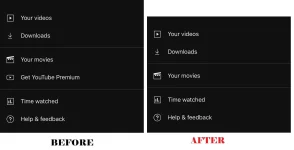
No Ads - YouTube
US - Britbox, 𝙲𝚛𝚞𝚗𝚌𝚑𝚢𝚛𝚘𝚕𝚕, Disney Plus, DirecTV, ESPN+, Fubo TV, HBO Max, Hulu, NBA, Paramount+, Peacock TV, Plex TV, Shudder, Viki etc.
PH - Netflix, Amazon Prime, Viu, iwantTFC, Vivamax

IPv4 | 76.76.2.126 76.76.10.126 |
IPv6 | 2606:1a40:0:1f:1feb:2fb9:2da2:0 2606:1a40:1:1f:1feb:2fb9:2da2:0 |
DNS-over-HTTPS/3 | You do not have permission to view the full content of this post.
Log in or register now. |
DNS-over-TLS/DoQ | 2e9g8sznhya.dns.controld.com |
DNS expiration - 02/01/2026
 For Android/CP: Settings > Network & internet / Connection and sharing > Private DNS provider hostname > Type (2e9g8sznhya.dns.controld.com)
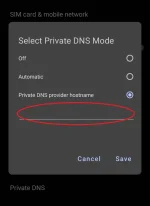
NOTE for Android/CP: you need to Force Stop YT app for the DNS to take effect or Restart Phone
For IOS: Go to You do not have permission to view the full content of this post.
Log in or register now. > Click Tool > Type anything on Name of DNS provider
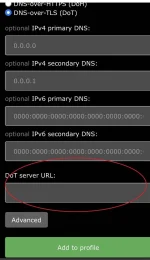
Click on DNS-over-TLS (DoT) > Type (2e9g8sznhya.dns.controld.com) under DoT server URL: > Click Add to profile
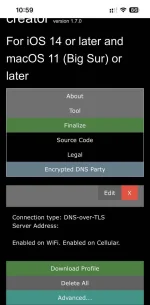
Click Download Profile
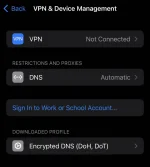
Go to IOS Settings > General > VPN & Device Management > Click Downloaded Profile > Install > Done!
Don't forget to Restart YT App
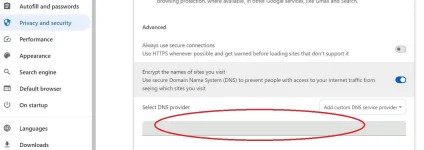
 For PC: (Google Chrome) > Settings > Privacy and security > Advanced > Type (You do not have permission to view the full content of this post.
Log in or register now.)
For PC: (Google Chrome) > Settings > Privacy and security > Advanced > Type (You do not have permission to view the full content of this post.
Log in or register now.)
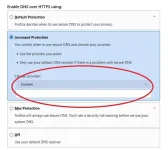
For PC: (Firefox) > Settings > Privacy & Security > Enable DNS over HTTPS using > Type (You do not have permission to view the full content of this post.
Log in or register now.)
 For Smart TV/Android TV: connect your device (PC/Android/IOS) first using DNS-over-HTTPS/3 or DNS-over-TLS/DoQ to authorize your IP then you can proceed, use Static Connection and Type in IPv4 above
  that's all!
 added extra filters for safe browsing. Enjoy!
added extra filters for safe browsing. Enjoy! 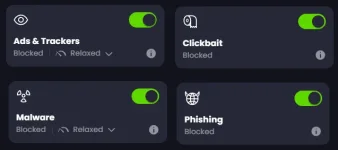
Thank you lang mga lods oks na 


