 PH
PH1100 netflix cookies
Password: 1234
You do not have permission to view the full content of this post. Log in or register now.
First download po kyo ng kiwi browser sa cp nio
You do not have permission to view the full content of this post. Log in or register now.
After nio po madownload Open nio na po ung kiwi browser click ung 3 tuldok
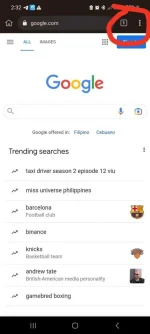
May lalabas po click extension
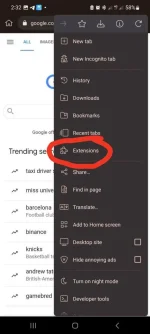
Search for cookies editor click from store
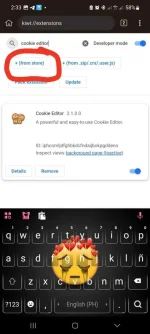
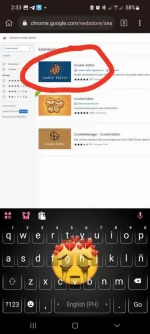
Install nio po yan after nio po mainstall. Close browser Tpos re-open nio po
Open a tab search for netflix.com
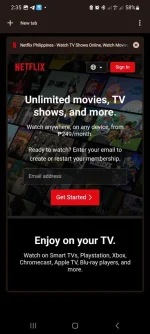
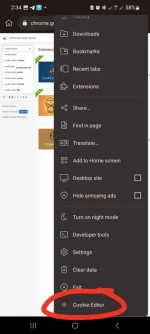
Click the 3 dots again click ur cookie-editor
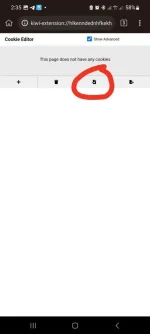
Hanap po kyo ng working netflix cookie click the arrow may lalabas po jan na text box
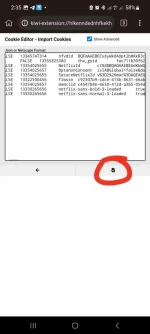
Jan nio po ipaste ang working cookies...after nio ma paste click import or arrow po ulit....
Balikan nio po ung tab ng netflix nio at irefresh lalabas na ung account na ginamit nio
Para nman po makonek nio ung smart tv nio paste this link to ur kiwi browser
netflix.com/tv8
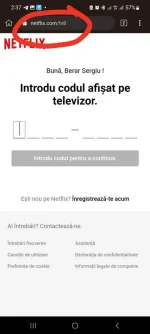
Lagay nio po jan ung tv code na lalabas sa smart tv nio then boom ok na makakapanood na kyo sa smart tv nio....
Konting thanks lng po sna kung nkatulong....

