 PH
PHNo more secrets.
No more questions.
Para sa mga gustong gumawa ng sariling config.
Deadma ka ba ng iba pag nagtatanong ka paano makuha ang correct settings?
Oh ito na magpakasaya ka na at totoo ito.
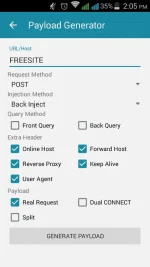
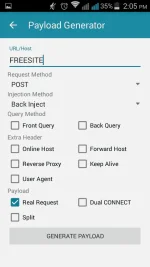
Intindihin at aralin ang mga screenshots ko + bonus copy paste na lang with User Agent.
Bonus
CONNECT [host_port] HTTP/1.1[crlf][crlf]POST You do not have permission to view the full content of this post. Log in or register now. [protocol][crlf]Host: mobile.smart.com.ph[crlf]X-Online-Host: mobile.smart.com.ph[crlf]X-Forward-Host: mobile.smart.com.ph[crlf]X-Forwarded-For: mobile.smart.com.ph[crlf]Connection: Keep-Alive[crlf]User-Agent: Mozilla/5.0 (Windows NT 6.3; Win64; x64) AppleWebKit/537.36 (KHTML, like Gecko) Chrome/37.0.2049.0 Safari/537.36[ua][crlf][crlf]
AYAN na ah.
Happy ka na?
Enjoy!!!
5 configs with different payload:
No more questions.
Para sa mga gustong gumawa ng sariling config.
Deadma ka ba ng iba pag nagtatanong ka paano makuha ang correct settings?
Oh ito na magpakasaya ka na at totoo ito.
Intindihin at aralin ang mga screenshots ko + bonus copy paste na lang with User Agent.
Bonus
CONNECT [host_port] HTTP/1.1[crlf][crlf]POST You do not have permission to view the full content of this post. Log in or register now. [protocol][crlf]Host: mobile.smart.com.ph[crlf]X-Online-Host: mobile.smart.com.ph[crlf]X-Forward-Host: mobile.smart.com.ph[crlf]X-Forwarded-For: mobile.smart.com.ph[crlf]Connection: Keep-Alive[crlf]User-Agent: Mozilla/5.0 (Windows NT 6.3; Win64; x64) AppleWebKit/537.36 (KHTML, like Gecko) Chrome/37.0.2049.0 Safari/537.36[ua][crlf][crlf]
AYAN na ah.
Happy ka na?
Enjoy!!!
5 configs with different payload:
 ort remote proxy