 PH
PHmaracero14
Eternal Poster
"KAHIT LEECHER KA PWEDE KA"
Good day mga ka phc..share ko lang ang mas pinadali at ma's pinaikli na tutorial kung paano gumawa ng sarili nation xp config..
Meron ibang tutorial na medyo mahirap unawain pero sa steps na I to konting utak lang ang gagamitin,so wag na nation patagalin pa,follow the screenshots ha...
STEPS:
1.Install xp psiphon
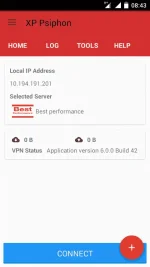
2.go to xp generator
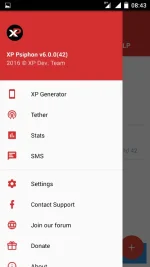
3.click xp generator then copy the image
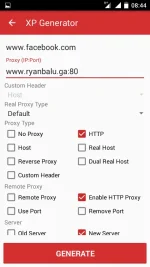
Note:doon sa proxy IP port dyan nyo ilalagay any working na remote proxy
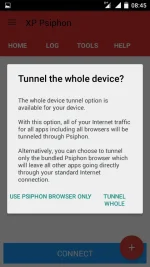
4.click generate,after generating click connect then click tunnel whole device
Para naman sa exporting para maishare nyo sa iba,follow this
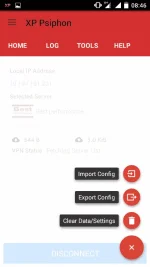
5.click the (+)plus sign,then export
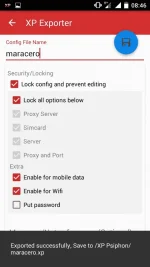
6.after we click the export,mapupunta tayo dito..diyan nyo ilalagay ang setting ng iyong ginawang xp config
So that's it..hope you like it,this is maracero,and I'm leaving you a simple message came from a hot girl in town....
"Sabi ng chick's sa akin,h'wag puro tingin...hipo-hipo din...
Good day mga ka phc..share ko lang ang mas pinadali at ma's pinaikli na tutorial kung paano gumawa ng sarili nation xp config..
Meron ibang tutorial na medyo mahirap unawain pero sa steps na I to konting utak lang ang gagamitin,so wag na nation patagalin pa,follow the screenshots ha...
STEPS:
1.Install xp psiphon
2.go to xp generator
3.click xp generator then copy the image
Note:doon sa proxy IP port dyan nyo ilalagay any working na remote proxy
4.click generate,after generating click connect then click tunnel whole device
Para naman sa exporting para maishare nyo sa iba,follow this
5.click the (+)plus sign,then export
6.after we click the export,mapupunta tayo dito..diyan nyo ilalagay ang setting ng iyong ginawang xp config
So that's it..hope you like it,this is maracero,and I'm leaving you a simple message came from a hot girl in town....
"Sabi ng chick's sa akin,h'wag puro tingin...hipo-hipo din...


