 PH
PHAfter having tooled around with a USB Linux version using your image overwritten or multi partitioned flash pen drive, you might find it necessary to revert it back to a single fat partition (restore the flash pen drive to its original state) that can again be read by all computers. Windows users can follow the Windows instructions below to Restore a Flash Drive using the HP USB Format Tool. For those working from Linux this task can easily be accomplished via the Linux Flash Drive Restoration tutorial that follows.
Restoring your USB key to its original state using Windows/Mac OS:
– Manual Method via Diskpart – Windows:
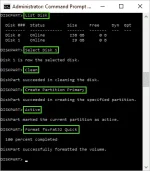
You do not have permission to view the full content of this post. Log in or register now..
Restoring your USB key to its original state using Windows/Mac OS:
– Manual Method via Diskpart – Windows:
- Open a command Prompt as administrator (cmd.exe)
- Type Diskpart and press Enter
- Type List Disk and press Enter
- Type Select Disk X (where X is the disk number of your USB drive) and press Enter
- Type Clean and press Enter
- Type Create Partition Primary and press Enter
- Type Active and press Enter
- Type Format fs=Fat32 Quick and press Enter
- Type Exit and press Enter
You do not have permission to view the full content of this post. Log in or register now..
