PH
PHKillerCrossover
Eternal Poster
Postern Configuration (kakadiskubri lang)
Credits Sa Bahay ng MGKKPTD
1st STEP:
A. Postern App (download nyo na lang, wala akong link)
B. Es File Xplorer (wala parin akong link)
C. 1 .prx file
You do not have permission to view the full content of this post. Log in or register now.
(Credits Sa Gumawa Nyan)
2nd STEP:
INSTALL nyo ung A at B syempre..
3rd STEP:
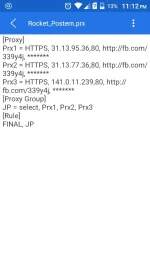
punta na sa ES File Xplorer tapos puntahan ung .prx file na dinownload nyo (yung Rocket Postern.prx) kung saan nyo man nailagay..
4th Step:
Then Click Open->Text->sa bandang kanan may 3 dots na makikita click nyo lang
..at may nakalagay dun na "EDIT"
so ayun iedit mo, change those RP's na makikita mo dun, username, password, group and etc then save.
5th Step:
CDC trick or kung ano mang ip address ung alam mong swak sa mga RP's na nilagay mo.
6th STEP:
Go to postern app, sa bandang kaliwa may makikita kang parang menu button, click mo lang then click import local..
Tapos hanapin mo na yung edited .prx file mo..
7th STEP:
VPN ON mo..
Boom! Connected na diba??
Medyo lasing nako.. Kaya intindihin nyo na lang. Haha..
Feedback mga paps.
Like lang sapat na..
Bisitahin nyo rin:
Postern VPN With 5 Different RP's
https://phcorner.org/t/postern-vpn-...th-5-different-rps.238717/page-2#post-2909003
Postern VPN config With 15 Proxy inside (Proxy Group by Sir NOCHE ) :
https://phcorner.org/t/postern-config-proxy-group-with-15-proxy-inside.238752/#post-2909523
Credits Sa Bahay ng MGKKPTD
1st STEP:
A. Postern App (download nyo na lang, wala akong link)
B. Es File Xplorer (wala parin akong link)
C. 1 .prx file
You do not have permission to view the full content of this post. Log in or register now.
(Credits Sa Gumawa Nyan)
2nd STEP:
INSTALL nyo ung A at B syempre..
3rd STEP:
punta na sa ES File Xplorer tapos puntahan ung .prx file na dinownload nyo (yung Rocket Postern.prx) kung saan nyo man nailagay..
4th Step:
Then Click Open->Text->sa bandang kanan may 3 dots na makikita click nyo lang
..at may nakalagay dun na "EDIT"
so ayun iedit mo, change those RP's na makikita mo dun, username, password, group and etc then save.
5th Step:
CDC trick or kung ano mang ip address ung alam mong swak sa mga RP's na nilagay mo.
6th STEP:
Go to postern app, sa bandang kaliwa may makikita kang parang menu button, click mo lang then click import local..
Tapos hanapin mo na yung edited .prx file mo..
7th STEP:
VPN ON mo..
Boom! Connected na diba??
Medyo lasing nako.. Kaya intindihin nyo na lang. Haha..
Feedback mga paps.
Like lang sapat na..
Bisitahin nyo rin:
Postern VPN With 5 Different RP's
https://phcorner.org/t/postern-vpn-...th-5-different-rps.238717/page-2#post-2909003
Postern VPN config With 15 Proxy inside (Proxy Group by Sir NOCHE ) :
https://phcorner.org/t/postern-config-proxy-group-with-15-proxy-inside.238752/#post-2909523