🔒 Closed How to increase android 3g, 4g, lte, h+, wcdma only network signal

Status
Not open for further replies.

imbz

Elite
upload_2014-11-12_19-5-18.webp
Procedure 1:

1. First try to change your sim, maybe your network coverage on your area is weak.

2. Set your network settings to LTE, WCDMA, GSM or Auto.
Go to Settings > Network Connection > Mobile Network > Network Mode. After getting in to the network mode you can select WCDMA Only

3. Reboot your phone or simply switch to Airplane Mode then switch back to normal mode.
If this procedure will not work you can also try below procedure.

Procedure 2:

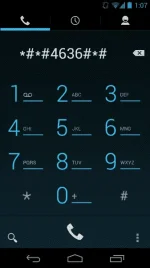
1. Open your dialer

2. Type ##4636#*# on your dialer as shown below.
upload_2014-11-12_19-8-5.webp

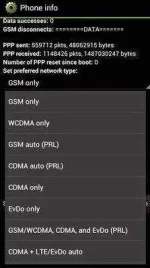
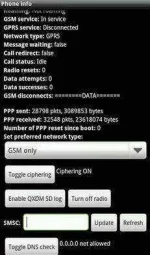
3. The secret menu will show up. In Phone Info find Set Preferred Network type:
upload_2014-11-12_19-8-40.webp

4. Now you can change to WCDMA Only.

upload_2014-11-12_19-8-51.webp

5. Reboot your phone or simply switch to Airplane Mode then switch back to normal mode.
Credit to April Bautista (y)
 
pwede ka naman pumunta nalang sa setting ng phone (esp. samsung android phones) mobile network then network type :)
 
boss, di po gumana ung number na need i-dial, nag try po aq ng normal procedure, after ko po i-select ung 3G at nag reboot, di na po nagka signal, globe user here po ..
 
Pls help when i click wcdma only it works always 3g then when i on the data it turns to H but few seconds boom its always down the signal to empty bar. Then x signal for a whole time wether i turn off the data.
 
Status
Not open for further replies.

About this Thread

  • 99
    Replies
  • 99K
    Views
  • 93
    Participants
Last reply from:
xVash

Online now

Members online
413
Guests online
906
Total visitors
1,319

Forum statistics

Threads
2,287,971
Posts
29,048,006
Members
1,215,838
Latest member
let me peek
Back
Top