 PH
PH.

If you are using Windows Vista or 7 and your graphics card supports Aero, then you must be enjoying the transparent windows having glass in their borders. The one and only thing which doesn't match with the new Aero interface is "Command Prompt" window.
Microsoft has not changed anything in the Command Prompt window. Its same since ages. Many people use Command Prompt regularly. Wouldn't it be great if we can somehow make the Command Prompt window transparent and have glass in it?
Here your wish comes true.
Thanks to the developer "Komalo" who created this very small AutoIt script which runs in background and enables glass in all command prompt windows.
How To Make My CMD Transparent?
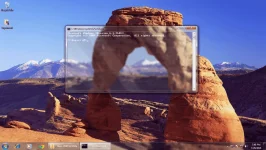
Screenshot:
Related Thread ==> Glass Notepad
.
NOTE: According to the developer, due to use of UPX compression some antivirus programs might throw virus warning for this app. There is no need to worry, its false positive.
If you are using Windows Vista or 7 and your graphics card supports Aero, then you must be enjoying the transparent windows having glass in their borders. The one and only thing which doesn't match with the new Aero interface is "Command Prompt" window.
Microsoft has not changed anything in the Command Prompt window. Its same since ages. Many people use Command Prompt regularly. Wouldn't it be great if we can somehow make the Command Prompt window transparent and have glass in it?
Here your wish comes true.
Thanks to the developer "Komalo" who created this very small AutoIt script which runs in background and enables glass in all command prompt windows.
How To Make My CMD Transparent?
- First download the RAR file then extract it. ( File attached | Password = thank you phc )
- Now run Glass CMD.exe file and open Command Prompt. It'll have the glass effect automatically.
- Done, enjoy its glassy effect.
Screenshot:
Related Thread ==> Glass Notepad
.


