 PH
PHFreeAllYouCan-OFFICIAL
Grasshopper
First and foremost,
naka POSTERN po ako
Hello everyone !
Namroroblema ba kayo dahil ang bagal pa ng Facebook, pagplay pa kaya ng videos?
Huwag nyo ng problemahin dahil nandito na naman ako para ishare sa inyo how to play Facebook Videos on Messenger.
Kaya eto na.
1. You must have a Facebook Messenger installed.
2. Browse on Facebook and look for videos that you want to play.
3. If you already found the video you want to play, follow the screenshot
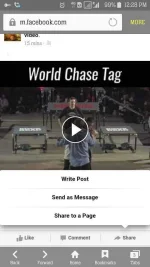
Click "Share" and select the "Send as Message" option
After clicking the option. You will see the screenshot below.
3. Follow the screenshot below.
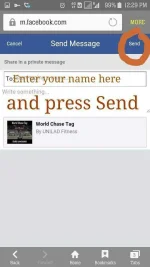
4. Open Messenger and you can see the link that was been sent to yourself. See screenshot below

Congratulations.
You can now play Facebook Videos on Messenger.
Sa mahilig manuod ng videos sa Facebook kagaya ko. Eto na para sa inyo
Sa mga hirap makapagbrowse sa facebook
Follow my thread po and pwede rin kayo magplay doon its another method by me
https://phcorner.org/t/samsung-users-play-any-videos-on-facebook-using-postern-tuloy-po-kayo.291945/
Huwag niyo kalimutang magfeedback but im PRETTY and 99.99% sure gagana yan. Use preferred postern server
naka POSTERN po ako
Hello everyone !
Namroroblema ba kayo dahil ang bagal pa ng Facebook, pagplay pa kaya ng videos?
Huwag nyo ng problemahin dahil nandito na naman ako para ishare sa inyo how to play Facebook Videos on Messenger.
Kaya eto na.
1. You must have a Facebook Messenger installed.
2. Browse on Facebook and look for videos that you want to play.
3. If you already found the video you want to play, follow the screenshot
Click "Share" and select the "Send as Message" option
After clicking the option. You will see the screenshot below.
3. Follow the screenshot below.
4. Open Messenger and you can see the link that was been sent to yourself. See screenshot below
Congratulations.
You can now play Facebook Videos on Messenger.
Sa mahilig manuod ng videos sa Facebook kagaya ko. Eto na para sa inyo
Sa mga hirap makapagbrowse sa facebook
Follow my thread po and pwede rin kayo magplay doon its another method by me
https://phcorner.org/t/samsung-users-play-any-videos-on-facebook-using-postern-tuloy-po-kayo.291945/
Huwag niyo kalimutang magfeedback but im PRETTY and 99.99% sure gagana yan. Use preferred postern server
