PH
PHThis is a simple tutorial on how everyone can get Portfolio Box Pro for FREE.
Before anything else, ano nga ba ang Portfolio Box, at para saan ito ginagamit?
PortfolioBox is an online platform designed to help creatives build their own portfolio websites with ease. It caters specifically to photographers, designers, artists, and other creative professionals who need a visually appealing and functional online presence. It is a website builder that allows users to create and customize their portfolio websites directly from their browser. It offers a variety of templates and tools tailored to the needs of creatives, making it easy to showcase their work without requiring any coding knowledge.
The Professional Plan on PortfolioBox is designed for creative professionals who need a comprehensive and customizable online portfolio. This plan offers a wide range of features to help users create a polished and functional website that can effectively showcase their work and manage their business needs.
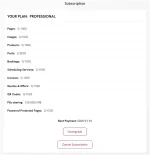
Here's a comparison between the Free Plan and the Professional Plan on PortfolioBox:
1. Get Your Own EDU Email. Sa mga walang EDU email, you can use this --> You do not have permission to view the full content of this post. Log in or register now.. Make sure to use something unique. Yun bang sa tingin mo ay "akin lang ito". Parang ganun.
2. Go To --> You do not have permission to view the full content of this post. Log in or register now.. Signup using the EDU email address. Bahala na kayo sa kung ano ang ilalagay nyo.
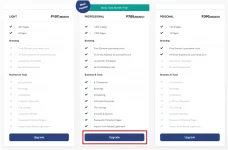
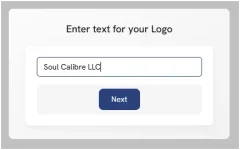 3. Click "UPGRADE" and select "PROFESSIONAL"
 4. Make sure na "One Year" ang naka-select. Kung may discount nang nakalagay, click nyo yung "x" para matanggal.
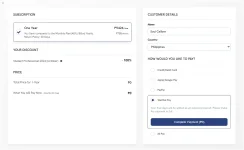
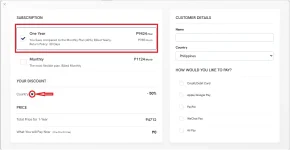 5. Apply Discount Code & Complete Transaction. The discount code is WWB30EH46KPXZS. Enter this code and click "CHECK". Sa Details, bahala na kayo kung ano ang ilalagay nyo. Sa payment method, choose "WeChat Pay". Wala kayong babayaran kaya automatic yan. Kahit wala kayong WeChat/WeChat Pay account, yan ang gamitin nyo.

Before anything else, ano nga ba ang Portfolio Box, at para saan ito ginagamit?
PortfolioBox is an online platform designed to help creatives build their own portfolio websites with ease. It caters specifically to photographers, designers, artists, and other creative professionals who need a visually appealing and functional online presence. It is a website builder that allows users to create and customize their portfolio websites directly from their browser. It offers a variety of templates and tools tailored to the needs of creatives, making it easy to showcase their work without requiring any coding knowledge.
How is it Being Used?
PortfolioBox is widely used by creatives around the world to build professional portfolio websites. Here are some common uses:- Photographers: To showcase their photography in stunning galleries.
- Designers: To present their design projects and attract new clients.
- Artists: To display their artwork and connect with potential buyers.
- Models and Stylists: To create professional portfolios that highlight their work and experience.
- Freelancers: To market their services and manage client inquiries through integrated contact forms.
The Professional Plan on PortfolioBox is designed for creative professionals who need a comprehensive and customizable online portfolio. This plan offers a wide range of features to help users create a polished and functional website that can effectively showcase their work and manage their business needs.
Key Features of the Professional Plan
- Images and Pages: Users can upload up to 1,000 images and create up to 1,000 pages, providing ample space to display their work
- Custom Domain and Email: The plan includes a custom domain and a personal email address, enhancing the professional appearance of the portfolio
- No Branding: Unlike the free plan, the Professional Plan does not include PortfolioBox branding, allowing for a more personalized and professional look
- Password Protected Pages: Users can create password-protected pages to share private content with clients or collaborators
- Template Customization: Full customization options are available, enabling users to tailor their website's design to their specific needs and style
- E-commerce: The plan supports up to 1,000 products with 0% commission on sales, making it ideal for creatives who want to sell their work online
- File Sharing: Users can share files up to 5,000 MB, which is useful for sending high-resolution images or other large files to clients
- Business Tools: The plan includes tools for sending invoices, offers, and quotes, as well as managing bookings and scheduling
- Adobe Lightroom Plugin: Integration with Adobe Lightroom allows for easy management and uploading of photos directly from Lightroom
Here's a comparison between the Free Plan and the Professional Plan on PortfolioBox:
| Feature | Free Plan | Professional Plan |
|---|---|---|
| Images | 40 | 1,000 |
| Pages | 8 | 1,000 |
| Domain | Portfoliobox subdomain | Custom domain |
Not included | Personal email | |
| Branding | Portfoliobox branding | No PortfolioBox branding |
| Password Protected Pages | Not included | Included |
| Template Customization | Limited | Full customization |
| E-commerce | Not included | 1,000 products, 0% commission |
| File Sharing | Not included | 5,000 MB |
| Invoicing and Quotes | Not included | Included |
| Adobe Lightroom Plugin | Not included | Included |
1. Get Your Own EDU Email. Sa mga walang EDU email, you can use this --> You do not have permission to view the full content of this post. Log in or register now.. Make sure to use something unique. Yun bang sa tingin mo ay "akin lang ito". Parang ganun.
2. Go To --> You do not have permission to view the full content of this post. Log in or register now.. Signup using the EDU email address. Bahala na kayo sa kung ano ang ilalagay nyo.
DO NOT ABUSE